Login information for Dreamstime
Hola!
Login information for our account in Dreamstime!
username: adminp1p
password: page1234

Hola!
Login information for our account in Dreamstime!
username: adminp1p
password: page1234

Do we have a Jetpack account to use across all our sites?

If a client wants a photo from Dreamstime, we charge the client $2 per credit.

i asked jane and here is a helpful answer and link from an SEO expert, Neil Patel.
Juan wrote a 4-step guide to create a form and insert it to a page/post. Here is his step by step process: Contact Form 7 – Step by Step

Woot! Thanks, Juan! Thanks for posting Meagan.

Photo selection process

This is a template for what I have been sending clients:
For IMAGES, we suggest you search on istockphotos.com. Attached you will find a spreadsheet which you can use to let us know your image selections. (Please do NOT purchase the images. We will purchase them in the correct size for your site, usually small, or x-small.)
To see the cost of the photo, click on Show $USD Pricing (see image below) This will change the price from credits to dollars.
We recommend that all your images share a common theme – nature, sad/distressed people, or happy people, etc.

This is important specially those posts containing sensitive information like passwords.
Here is how they describe it in wordpress:
Private content is published only for your eyes, or the eyes of only those with authorization permission levels to see private content. Normal users and visitors will not be aware of private content. It will not appear in the article lists. If a visitor were to guess the URL for your private post, they would still not be able to see your content. You will only see the private content when you are logged into your WordPress blog.
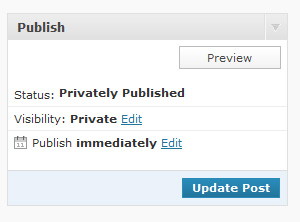
Once you change the visibility to private, the post or page status changes to “Privately Published” as shown. Private posts are automatically published but not visible to anyone but those with the appropriate permission levels (Editor or Administrator).
P.S. For posts already published – in the dashboard, click “All Posts” then hover above the post you want to make private, click “quick edit” then check the box shown here: http://screencast.com/t/wPcxpVFZ. Don’t forget to click UPDATE. 🙂
I’d like to build a list of all the free reports we’ve done. Thus far, I have the free reports on these pages, but I know there are more:
http://www.orensteinsolutions.com/marriage-counseling/
http://janerubinphd.com/
Writers and PCs, please respond with others you’ve helped with.
Thanks.
Hey PCs – this is the template I have found useful for taking notes during the Kickoff meeting. Its easy to just copy and paste these into an email body for the client after the meeting – Kickoff Meeting Minutes Template
Tenants and coworking residents can use the HP CM1312 color laser jet printer in the coworking area when they need to copy, scan, or print something. To set up the printer with your computer:
On Mac:
1. GotoSystemPreferences 2. Clickon“PrintandFax”
3. Clickthe+iconatthebottomoftheprinterlist
4. Select“HPColorLaserJetCM1312nfiMFP(800B5D)-1”fromthelistofprinters
5. Click“Add”
On Windows:
Go to the HP website and select your operating system
Download the appropriate driver and install it
When prompted to choose a mode, choose “Traditional Mode”
When the Add Printer Wizard opens, follow the prompts and choose “Local Printer”
Uncheck the box that says “Automatically detect and install my Plug and Play printer” and click Next
Select the radio button for “Create a New Port” and choose “Standard TCP/IP Port” from the drop-down menu
In the field that says “Printer Name or IP Address,” type 192.168.1.15
 Becky DeGrossa is discussing.
  Suzanne Neuman is discussing.
Reply
You must be logged in to post a comment.