
How To Make A Post Private
This is important specially those posts containing sensitive information like passwords.
Here is how they describe it in wordpress:
Private content is published only for your eyes, or the eyes of only those with authorization permission levels to see private content. Normal users and visitors will not be aware of private content. It will not appear in the article lists. If a visitor were to guess the URL for your private post, they would still not be able to see your content. You will only see the private content when you are logged into your WordPress blog.
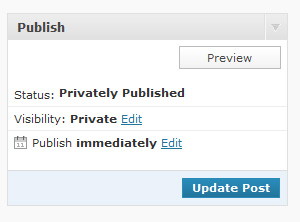
Once you change the visibility to private, the post or page status changes to “Privately Published” as shown. Private posts are automatically published but not visible to anyone but those with the appropriate permission levels (Editor or Administrator).
P.S. For posts already published – in the dashboard, click “All Posts” then hover above the post you want to make private, click “quick edit” then check the box shown here: http://screencast.com/t/wPcxpVFZ. Don’t forget to click UPDATE. 🙂
Reply
You must be logged in to post a comment.