Photo Selection Video
If clients need help with the photo selection process, send them this video: http://www.youtube.com/watch?v=XzKdQRZ7aJA&feature=youtu.be

If clients need help with the photo selection process, send them this video: http://www.youtube.com/watch?v=XzKdQRZ7aJA&feature=youtu.be
If you want a logo designed, below is information about your options and what we need from you.
You will need to provide:
Here are three that we have done:
http://www.nevillecounseling.com
http://www.practicebuildingbook.com/klara/
http://www.counselingwise.com
1. You can go to http://www.fiverr.com and do it yourself – the starting price is $5, and will take your time.
2. We can do it for you, which will cost between $100-$150.
3. You can go to 99 Designs (http://99designs.com) and buy one there (this orients them and lets them see that it costs a minimum of $299 to get a logo.
Along with a logo, most people include a tagline. A tagline will vary depending on your logo name, and sometimes your locations (for example: if your logo name is Neville Counseling – you obviously already do counseling, so you can talk about the populations your serve. If the logo is your name, you need to include information about what you provide and possibly your location. If you are in a city where location is extremely important to people (like NYC), you may want to include a neighborhood in your tagline (for example practicebuildingbook.com/Peggy).
If a client wants a photo from Dreamstime, we charge the client $2 per credit.
Juliette had a client that asked the following question: “I do have a question. After the website is live, still, how do potential clients know that my website exists? How do they know what my name is, where to find me, my domain name etc……I’m sure everyone wants to know this as well.”
The best way to answer this is by saying (from Becky):
“I would FIRST state that, as part of our website work, we optimize your site so that google gets signals as to what your site is about (spiritual counseling, etc.) However, there are a lot of factors that Google considers when ranking sites, so often, more pages are needed and more time is needed in order for you to rank for your desired terms.
Google places is a vehicle that can also help your ability to rank and get traffic. We can talk with you about this work, as well.
Regarding showing up for searches for your name, your website should be the biggest signal online for your name, and google should serve up your site if your name is searched, however, we cannot control this. It may need to be looked at later, if your site does not come up when your name is searched as this sometimes does happen.
Adwords is the fastest way to get traffic online. Once a campaign is created, you can be on page 1 on day 1. You need to pay use to create your campaign, and then pay google click charges.
Finally, at the end, you can include suggestions to also do traditional marketing.”
Stuart Fensterheim wants to do his own citations for his Google Places listing. What is the best thing to tell him?

From Becky:
“To update ones we’ve already done, we can send him the logins and he can do.
To add more, he needs to find local and thematic directories and list his business there. We have a special paid tool that we use to find good ones. He’ll have to hunt. He should only submit to 10/month.
Anymore advice on that and he needs to pay for consulting. We’ve invested a lot in learning how to do it effectively and we can’t train him for free.”
Juan put together a great how to process on changing a free report on a website. One of our clients made some changes to her free report and wanted to update it. Here is how to do it: How to Edit Free Reports in Site
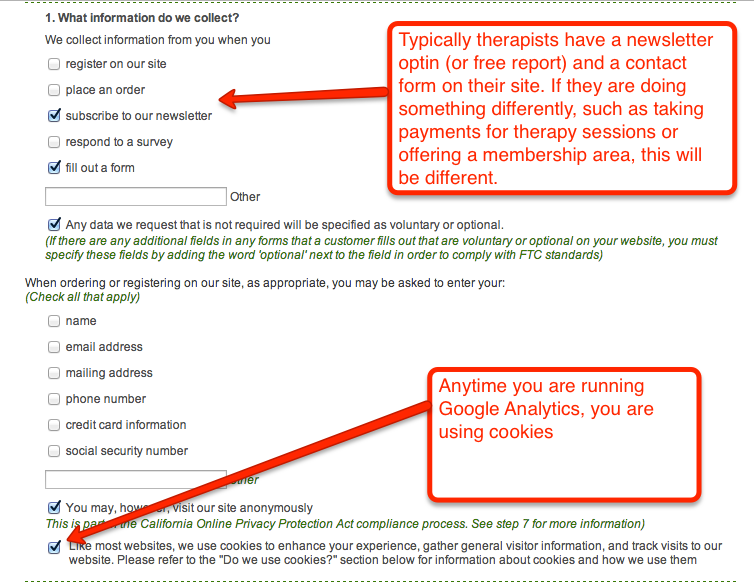
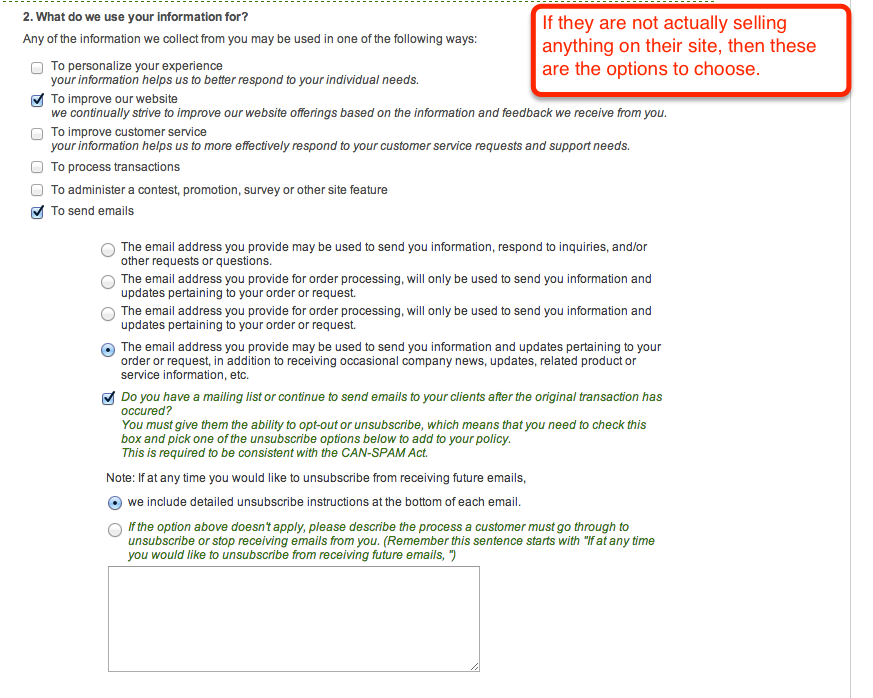
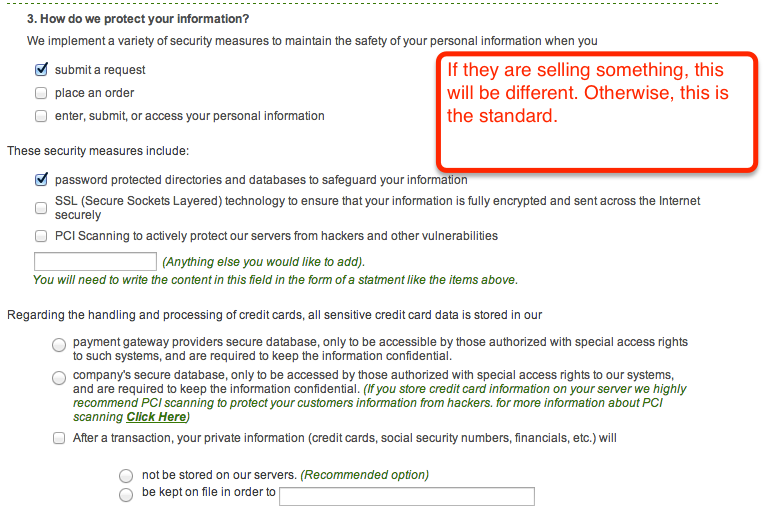
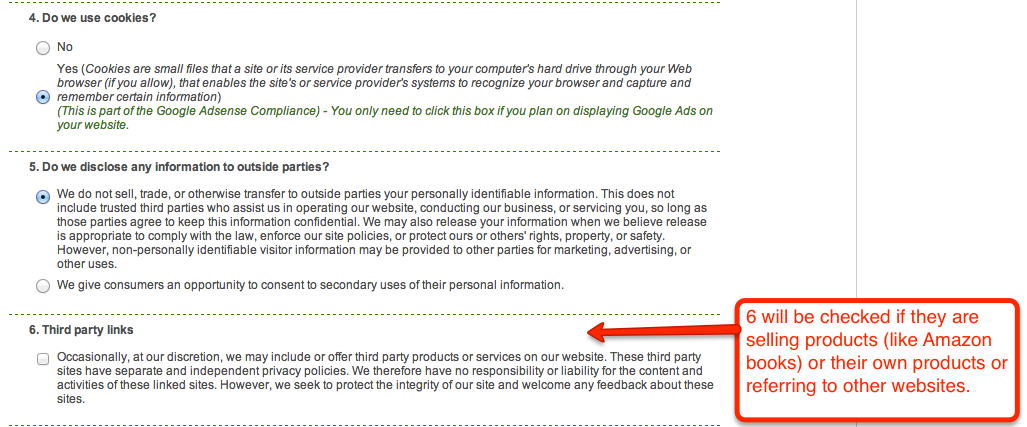
Before the developer can set up the privacy policy page, you must create a privacy policy. Below are the steps on how to do so (thanks to Dave for helping me learn!)
1. Go to http://www.freeprivacypolicy.com
2. Login with username: admin@page1pros.org and password: 848624
3. Click “Create Another Privacy Policy Now”
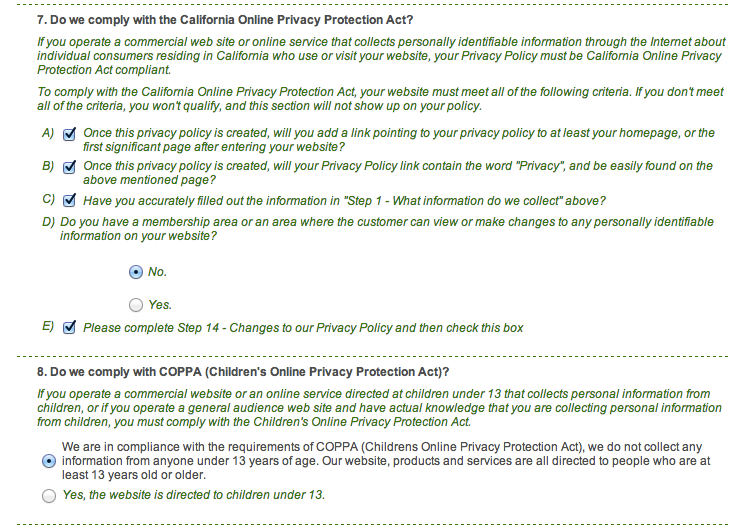
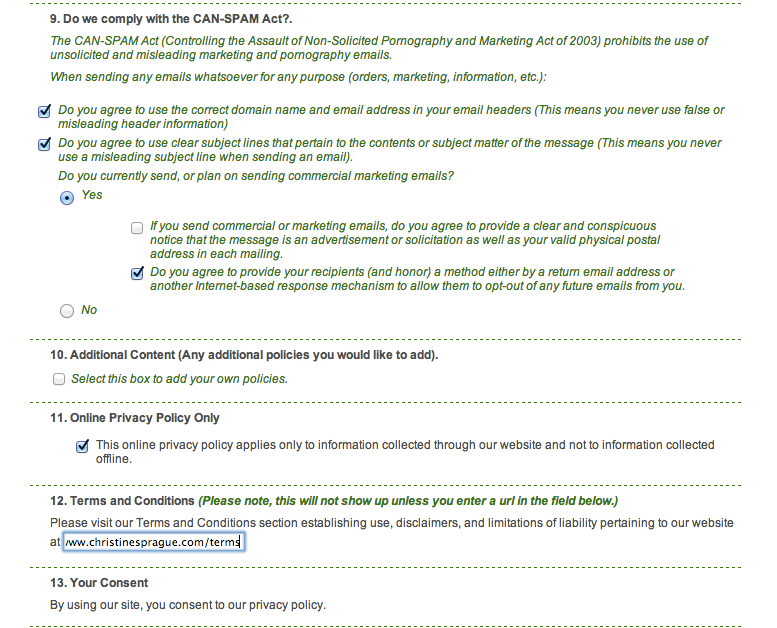
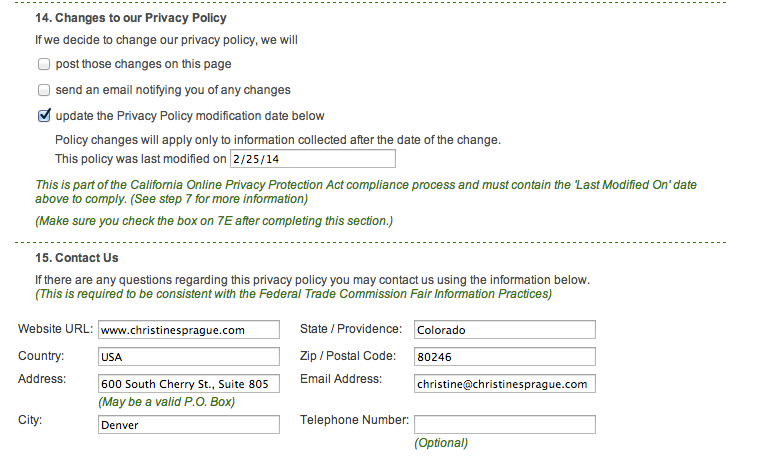
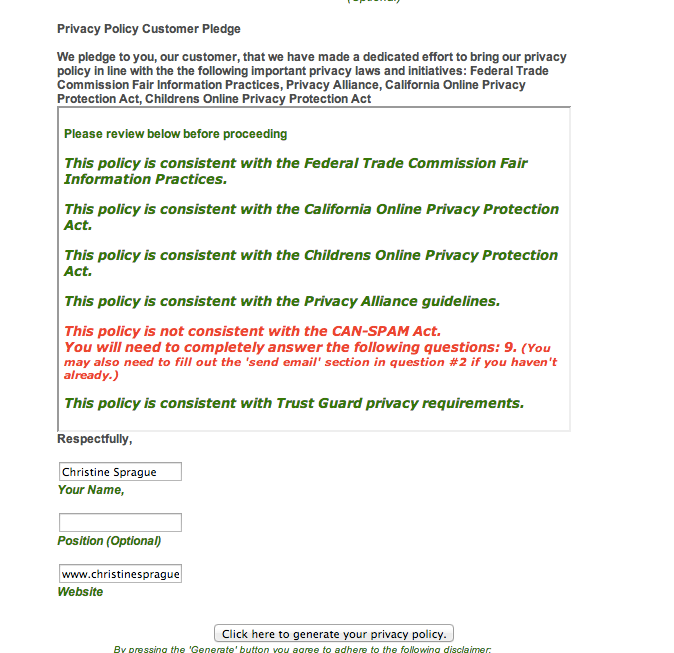
4. Fill out form – see attached screenshots for what to select
5. Click submit
6. Send login information to developer, so they can create a landing page (that opens in a new window) and a nav item in the footer.
Juan wrote a 4-step guide to create a form and insert it to a page/post. Here is his step by step process: Contact Form 7 – Step by Step

Woot! Thanks, Juan! Thanks for posting Meagan.
This is a good example of a professional credibility icon footer: http://barbarafane.com/
We did NOT create this site, but its a good example of professional associations in a footer.
 Meagan Vitek is discussing.
  Becky DeGrossa is discussing.
Reply
You must be logged in to post a comment.