Updates from Becky DeGrossa Toggle Comment Threads | Keyboard Shortcuts

  • Becky DeGrossa 2:48 am on March 11, 2014 Permalink |
    Tags: , ,   

    Categories: All ( 65 )

    CounselingWise – 2014 Vision and Goals 

    Hi all,

    Here’s the presentation I gave at our PC meeting on Thursday. Again, I’d love to hear any ideas that you’ve thought of since the presentation!

    Please share any ideas about our…
    –Purpose
    –Vision
    –Goals
    –Offerings you think we should pursue (or not pursue)
    –Any team building (FUN) ideas
    –Etc.

    (Hmmmm… can’t seem to upload it. I’ll ask Daryl for help.)
     
  • Becky DeGrossa 5:19 pm on February 7, 2014 Permalink |
    Tags:   

    Categories: Project Coordinators ( 113 )

    Photo or Image Selection Process 

    This is a template for what I have been sending clients. Also attached is the spreadsheet I send them and the image to show them how to see the price of the photo.

    For IMAGES, we suggest you search on istockphotos.com. Attached you will find a spreadsheet which you can use to let us know your image selections. (Please do NOT purchase the images. We will purchase them in the correct size for your site, usually small, or x-small.)

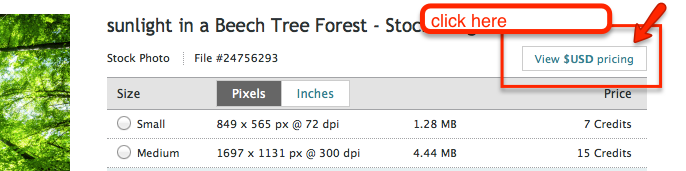
    To see the cost of the photo, click on Show $USD Pricing (see image below) This will change the price from credits to dollars.

    We recommend that all your images share a common theme – nature, sad/distressed people, or happy people, etc.istock view usd pricing Images for My Smart Therapy Website

     
  • Becky DeGrossa 6:11 pm on January 30, 2014 Permalink |
    Tags:   

    Categories: All ( 65 )

    Photo selection process

     
    • Suzanne Neuman 5:04 pm on February 7, 2014 Permalink | Log in to Reply

      This is a template for what I have been sending clients:

      For IMAGES, we suggest you search on istockphotos.com. Attached you will find a spreadsheet which you can use to let us know your image selections. (Please do NOT purchase the images. We will purchase them in the correct size for your site, usually small, or x-small.)

      To see the cost of the photo, click on Show $USD Pricing (see image below) This will change the price from credits to dollars.

      We recommend that all your images share a common theme – nature, sad/distressed people, or happy people, etc.

  • Becky DeGrossa 12:57 pm on January 30, 2014 Permalink |
    Tags:   

    Categories: All ( 65 )

    Calling all Free Reports! Writers and PCs, please respond! 

    I’d like to build a list of all the free reports we’ve done. Thus far, I have the free reports on these pages, but I know there are more:

    http://www.orensteinsolutions.com/marriage-counseling/
    http://janerubinphd.com/

    Welcome

    Writers and PCs, please respond with others you’ve helped with.

    Thanks.

     
  • Becky DeGrossa 9:32 pm on January 6, 2014 Permalink |  
    Categories: All ( 65 )

    Is there a “this is how to set up and access your e-mail” document? 

    Launching two new sites to hostgator today, and I’m curious if we have a standard instruction form to pass on to clients regarding how to access their new e-mail account. Searching in ‘geterdone” but no luck so far…

     
    • Becky DeGrossa 12:38 am on January 7, 2014 Permalink | Log in to Reply

      Best bet, so that folks don’t have to login to hostgator to see their email and deal with very substandard email managers (like Squirrelmail) is to have their email forwarded to their regular email (gmail, yahoo, etc.)

    • Juliette Cook 6:11 pm on January 7, 2014 Permalink | Log in to Reply

      Client wants to transfer godaddy email host to host gator. I am trying to convince her to forward to regular email. Client then asks, how can I ensure that my godaddy email inbox is preserved/no emails are lost in the transfer process? Anyone out there who has an answer for this? Is it possibly to have the website at HostGator and keep the email client with Go Daddy – how much extra is it for Go Daddy to host emails? This is for the purposes of not ‘losing any emails’ in the transfer process from GoDaddy to Host Gator.
      Please help if you can.

    • Dave Boylan 6:19 pm on January 7, 2014 Permalink | Log in to Reply

      Not sure how to guarantee anything, but a client that recently moved hosting to us was able to access her old c-panel at godaddy after her site had been moved. She then went in and forwarded all e-mails she needed to save. I would say this is a question the client needs to ask godaddy.

      • Juliette Cook 7:56 pm on January 7, 2014 Permalink | Log in to Reply

        just spoke to godadddy. seems they tell you to download your inbox emails to outlook/entourage – whatever webmail system on your computer if you have one.
        but this is what i recommended because the client in NOT tech savvy

        i told the non-tech savvy client this and also recommended they change their email to a free email like gmail if they do not want to pay for godaddy email hosting:

        If this is the case this is what I recommend – if you want to host with us at Host Gator, you can still keep your Go Daddy email account (since you already have this set up) – They offer an ‘imap’ email account that allows 10 email boxes per year for about $90 per year (less $$ if you sign up for 5 years). You would have your website hosted on HostGator and your email hosted on GoDaddy so that way you wouldn’t have to worry about losing any inbox emails.

        The other option with GoDaddy that HostGator does not do is the outlook exchange which is more of a syncronizing system that talks to calendars/intranets/etc which is only if someone uses outlook for everything.

        If you choose to change the email host and don’t want to pay go daddy for the email hosting, it is included in HostGator’s package. The recommendation though is to have your email sent to your regular email inbox at gmail or cox.net or whatever free inbox you have now instead of going onto HostGator’s email to retrieve all emails (it is just not as good as a .gmail or cox.net)

  • Becky DeGrossa 9:09 pm on December 27, 2013 Permalink |
    Tags:   

    Categories: Project Coordinators ( 113 )

    Verified By Psychology Today logo 

    verified by psychology today

     
  • Becky DeGrossa 9:02 pm on December 27, 2013 Permalink |
    Tags:   

    Categories: Project Coordinators ( 113 )

    AAMFT CREDIBILITY ICON 

    AAMFT ICON

     
  • Becky DeGrossa 8:58 pm on December 27, 2013 Permalink |  
    Categories: All ( 65 )

    where is the best place to store and maintain credibility icons?

     
    • Becky DeGrossa 8:59 pm on December 27, 2013 Permalink | Log in to Reply

      Maybe here? You’ll need to tag the post as credibility icons so it’s searchable.

    • Juan Villegas 9:02 pm on December 27, 2013 Permalink | Log in to Reply

      what are credibility icons? 😐

    • Dave Boylan 9:05 pm on December 27, 2013 Permalink | Log in to Reply

      They are the logos for the various organizations that counselors and therapists are affiliated with. We generally place them in the footer on the websites

    • Dave Boylan 9:06 pm on December 27, 2013 Permalink | Log in to Reply

      search this blog on “icon” and one will pop up

  • Becky DeGrossa 7:03 am on December 27, 2013 Permalink |
    Tags: org chart   

    Categories: All ( 65 )

    CounselingWise Organization Chart 

    Updated on 1/2/14 to reflect the loss of Juliana and the addition of two new MM/Report writers, Alia and Curt!  Welcome!

    Page1Pros_CounselingWise_Organization_(Becky) (1)

     
  • Becky DeGrossa 2:14 am on December 24, 2013 Permalink |
    Tags:   

    Categories: All ( 65 )

    Jane’s Elves Made a Video! 

    Check it out!

    Merry Christmas, you all!

    Becky

     
c
compose new post
j
next post/next comment
k
previous post/previous comment
r
reply
e
edit
o
show/hide comments
t
go to top
l
go to login
h
show/hide help
shift + esc
cancel